
autotroni
|
Joined:
Oct 2022
Posts:
58
Threads:
0
|
Thanks: 98
Given 22 thank(s) in 11 post(s)
|
(07-16-2020, 10:55 AM)aleksey-ms Wrote: Xentry OpenShell 12.2022 HHT (+C3) DAS WIS EPC STARFINDER VEDIAMO MONACO (Acronis L+UEFI) - mega
Computer requirements:- HDD or SDD 480 Gb
- RAM 4 Gb
- Processor with support for virtualization technology (enable virtualization in BIOS).
VHD image with Windows 10 LTSC x64 Rus (by default) + English.
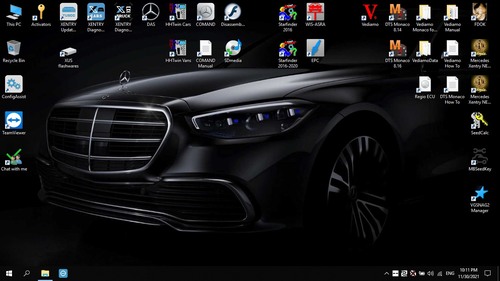
This version is a revision and modification of the 06.2022 image, it is fully configured for offline, all offline patches are applied and additional ones are activated. functions for DAS. A patch for Xentry Offline login has been applied. XUS 6.8.0.0 configured and activated! The data map in WIS and EPC has been configured, shortcuts for direct launch are also made, and the transition from Xentry and DAS to WIS is activated (WIS must already be launched before starting Xentry or DAS).
Why VHD and not Acronis? - VHD is a more universal format, you can immediately boot from it without expanding the image by making a couple of clicks in the Easy BCD program. Can be connected to virtual machines. You can deploy it as an acronym or other programs to disk (it is recommended to use VHD2DISK). In two clicks it is mounted in the system and you can take any information from there. Added Strelec WINPE and Rufus to create a bootable USB flash drive for image recovery.
Programs in the image:- Xentry OpenShell 12.2022
- DAS SCN offline coding (SDFlash 07.2018)
- Xentry OpenShell 09.2014 (virtual machine for SD Connect С3 and direct connections to ECU from DAS to HHTwin)
- Xentry Update Service 6.9.0.0
- Vediamo 05.01.01 + configured for С6, Xentry VCI, VCX SE
- DTS Monaco v8.14.016 + projects 2022 (8.16.015 with my activation) + configure for С6, Xentry VCI, VCX SE
- EPC 11.2018
- WIS 10.2020
- WIS standalone 2021/07
- StarFinder 2016 (with wiring diagrams) + 2020 (without)
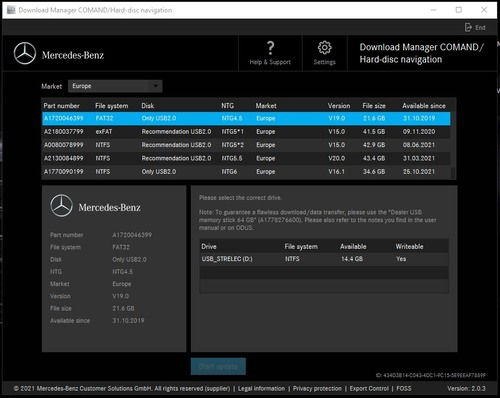
- COMANDDownloadManager login: DLM password: DLM
- HTTwin на Hyper-V password: 111
- FDOK
- MBSeedKey + DLLs 2020
- Seed Calculator + DLLs 2020
- DisassembyAssistant
- Regio ECU 09.2014
- VGSNAG2 Manager v1.6
- SDmedia
- Vediamo and DTS Monaco manuals
Need it? Push buttons Rate (Reputation) and Thanks, PM for pass. Can you provide the password thanks....
|

aleksey-
|
Joined:
Nov 2019
Posts:
2,627
Threads:
283
|
Thanks: 7
Given 4852 thank(s) in 575 post(s)
|
(12-13-2022, 09:58 PM)autotroni Wrote: (07-16-2020, 10:55 AM)aleksey-ms Wrote: Xentry OpenShell 12.2022 HHT (+C3) DAS WIS EPC STARFINDER VEDIAMO MONACO (Acronis L+UEFI) - mega
Computer requirements:- HDD or SDD 480 Gb
- RAM 4 Gb
- Processor with support for virtualization technology (enable virtualization in BIOS).
VHD image with Windows 10 LTSC x64 Rus (by default) + English.
This version is a revision and modification of the 06.2022 image, it is fully configured for offline, all offline patches are applied and additional ones are activated. functions for DAS. A patch for Xentry Offline login has been applied. XUS 6.8.0.0 configured and activated! The data map in WIS and EPC has been configured, shortcuts for direct launch are also made, and the transition from Xentry and DAS to WIS is activated (WIS must already be launched before starting Xentry or DAS).
Why VHD and not Acronis? - VHD is a more universal format, you can immediately boot from it without expanding the image by making a couple of clicks in the Easy BCD program. Can be connected to virtual machines. You can deploy it as an acronym or other programs to disk (it is recommended to use VHD2DISK). In two clicks it is mounted in the system and you can take any information from there. Added Strelec WINPE and Rufus to create a bootable USB flash drive for image recovery.
Programs in the image:- Xentry OpenShell 12.2022
- DAS SCN offline coding (SDFlash 07.2018)
- Xentry OpenShell 09.2014 (virtual machine for SD Connect С3 and direct connections to ECU from DAS to HHTwin)
- Xentry Update Service 6.9.0.0
- Vediamo 05.01.01 + configured for С6, Xentry VCI, VCX SE
- DTS Monaco v8.14.016 + projects 2022 (8.16.015 with my activation) + configure for С6, Xentry VCI, VCX SE
- EPC 11.2018
- WIS 10.2020
- WIS standalone 2021/07
- StarFinder 2016 (with wiring diagrams) + 2020 (without)
- COMANDDownloadManager login: DLM password: DLM
- HTTwin на Hyper-V password: 111
- FDOK
- MBSeedKey + DLLs 2020
- Seed Calculator + DLLs 2020
- DisassembyAssistant
- Regio ECU 09.2014
- VGSNAG2 Manager v1.6
- SDmedia
- Vediamo and DTS Monaco manuals
Need it? Push buttons Rate (Reputation) and Thanks, PM for pass. Can you provide the password thanks.... Need it? Push buttons Rate (Reputation) and Thanks, PM for pass.
|
japes8466
|
Joined:
Nov 2022
Posts:
89
Threads:
0
|
Thanks: 2
Given 27 thank(s) in 12 post(s)
|
(07-16-2020, 10:55 AM)aleksey-ms Wrote: Xentry OpenShell 12.2022 HHT (+C3) DAS WIS EPC STARFINDER VEDIAMO MONACO (Acronis L+UEFI) - mega
Computer requirements:- HDD or SDD 480 Gb
- RAM 4 Gb
- Processor with support for virtualization technology (enable virtualization in BIOS).
VHD image with Windows 10 LTSC x64 Rus (by default) + English.
This version is a revision and modification of the 06.2022 image, it is fully configured for offline, all offline patches are applied and additional ones are activated. functions for DAS. A patch for Xentry Offline login has been applied. XUS 6.8.0.0 configured and activated! The data map in WIS and EPC has been configured, shortcuts for direct launch are also made, and the transition from Xentry and DAS to WIS is activated (WIS must already be launched before starting Xentry or DAS).
Why VHD and not Acronis? - VHD is a more universal format, you can immediately boot from it without expanding the image by making a couple of clicks in the Easy BCD program. Can be connected to virtual machines. You can deploy it as an acronym or other programs to disk (it is recommended to use VHD2DISK). In two clicks it is mounted in the system and you can take any information from there. Added Strelec WINPE and Rufus to create a bootable USB flash drive for image recovery.
Programs in the image:- Xentry OpenShell 12.2022
- DAS SCN offline coding (SDFlash 07.2018)
- Xentry OpenShell 09.2014 (virtual machine for SD Connect С3 and direct connections to ECU from DAS to HHTwin)
- Xentry Update Service 6.9.0.0
- Vediamo 05.01.01 + configured for С6, Xentry VCI, VCX SE
- DTS Monaco v8.14.016 + projects 2022 (8.16.015 with my activation) + configure for С6, Xentry VCI, VCX SE
- EPC 11.2018
- WIS 10.2020
- WIS standalone 2021/07
- StarFinder 2016 (with wiring diagrams) + 2020 (without)
- COMANDDownloadManager login: DLM password: DLM
- HTTwin на Hyper-V password: 111
- FDOK
- MBSeedKey + DLLs 2020
- Seed Calculator + DLLs 2020
- DisassembyAssistant
- Regio ECU 09.2014
- VGSNAG2 Manager v1.6
- SDmedia
- Vediamo and DTS Monaco manuals
Need it? Push buttons Rate (Reputation) and Thanks, PM for pass.
thank you
|
aleksey-
|
Joined:
Nov 2019
Posts:
2,627
Threads:
283
|
Thanks: 7
Given 4852 thank(s) in 575 post(s)
|
(01-03-2023, 10:50 AM)japes8466 Wrote: (07-16-2020, 10:55 AM)aleksey-ms Wrote: Xentry OpenShell 12.2022 HHT (+C3) DAS WIS EPC STARFINDER VEDIAMO MONACO (Acronis L+UEFI) - mega
Computer requirements:- HDD or SDD 480 Gb
- RAM 4 Gb
- Processor with support for virtualization technology (enable virtualization in BIOS).
VHD image with Windows 10 LTSC x64 Rus (by default) + English.
This version is a revision and modification of the 06.2022 image, it is fully configured for offline, all offline patches are applied and additional ones are activated. functions for DAS. A patch for Xentry Offline login has been applied. XUS 6.8.0.0 configured and activated! The data map in WIS and EPC has been configured, shortcuts for direct launch are also made, and the transition from Xentry and DAS to WIS is activated (WIS must already be launched before starting Xentry or DAS).
Why VHD and not Acronis? - VHD is a more universal format, you can immediately boot from it without expanding the image by making a couple of clicks in the Easy BCD program. Can be connected to virtual machines. You can deploy it as an acronym or other programs to disk (it is recommended to use VHD2DISK). In two clicks it is mounted in the system and you can take any information from there. Added Strelec WINPE and Rufus to create a bootable USB flash drive for image recovery.
Programs in the image:- Xentry OpenShell 12.2022
- DAS SCN offline coding (SDFlash 07.2018)
- Xentry OpenShell 09.2014 (virtual machine for SD Connect С3 and direct connections to ECU from DAS to HHTwin)
- Xentry Update Service 6.9.0.0
- Vediamo 05.01.01 + configured for С6, Xentry VCI, VCX SE
- DTS Monaco v8.14.016 + projects 2022 (8.16.015 with my activation) + configure for С6, Xentry VCI, VCX SE
- EPC 11.2018
- WIS 10.2020
- WIS standalone 2021/07
- StarFinder 2016 (with wiring diagrams) + 2020 (without)
- COMANDDownloadManager login: DLM password: DLM
- HTTwin на Hyper-V password: 111
- FDOK
- MBSeedKey + DLLs 2020
- Seed Calculator + DLLs 2020
- DisassembyAssistant
- Regio ECU 09.2014
- VGSNAG2 Manager v1.6
- SDmedia
- Vediamo and DTS Monaco manuals
Need it? Push buttons Rate (Reputation) and Thanks, PM for pass.
thank you Welcome ! Need it? Push buttons Rate (Reputation) and Thanks, PM for pass.
|
aleksey-
|
Joined:
Nov 2019
Posts:
2,627
Threads:
283
|
Thanks: 7
Given 4852 thank(s) in 575 post(s)
|
Added Xentry OpenShell 03.2023 HHT (+C3) DAS WIS EPC STARFINDER VEDIAMO MONACO (Acronis L+UEFI)
|
aleksey-
|
Joined:
Nov 2019
Posts:
2,627
Threads:
283
|
Thanks: 7
Given 4852 thank(s) in 575 post(s)
|
Added Xentry OpenShell 06.2023 XUS HHT DAS WIS EPC STARFINDER VEDIAMO MONACO (Acronis)
|
CarMedic
|
Joined:
Apr 2023
Posts:
16
Threads:
2
|
Thanks: 71
Given 13 thank(s) in 3 post(s)
|
|
aleksey-
|
Joined:
Nov 2019
Posts:
2,627
Threads:
283
|
Thanks: 7
Given 4852 thank(s) in 575 post(s)
|
(06-25-2023, 06:40 PM)CarMedic Wrote: pass?
Thanks
a greeting
Need it? Push buttons Rate (Reputation) and Thanks, PM for pass.
|
aleksey-
|
Joined:
Nov 2019
Posts:
2,627
Threads:
283
|
Thanks: 7
Given 4852 thank(s) in 575 post(s)
|
Added Xentry OpenShell 09.2023 HHT (+C3) DAS WIS EPC STARFINDER VEDIAMO MONACO (Acronis L+UEFI)
|
aleksey-
|
Joined:
Nov 2019
Posts:
2,627
Threads:
283
|
Thanks: 7
Given 4852 thank(s) in 575 post(s)
|
|
|






